Building AI Agents from Scratch
Most agent tutorials start with a framework. That is fine for shipping, but it hides the part worth understanding: the loop.
Building an agent from scratch is not about replacing frameworks. It is about learning what they wrap. Once the loop is clear, tool calls, memory, stop conditions, and model switching stop feeling like magic and start looking like normal software decisions.
What is an AI Agent?#
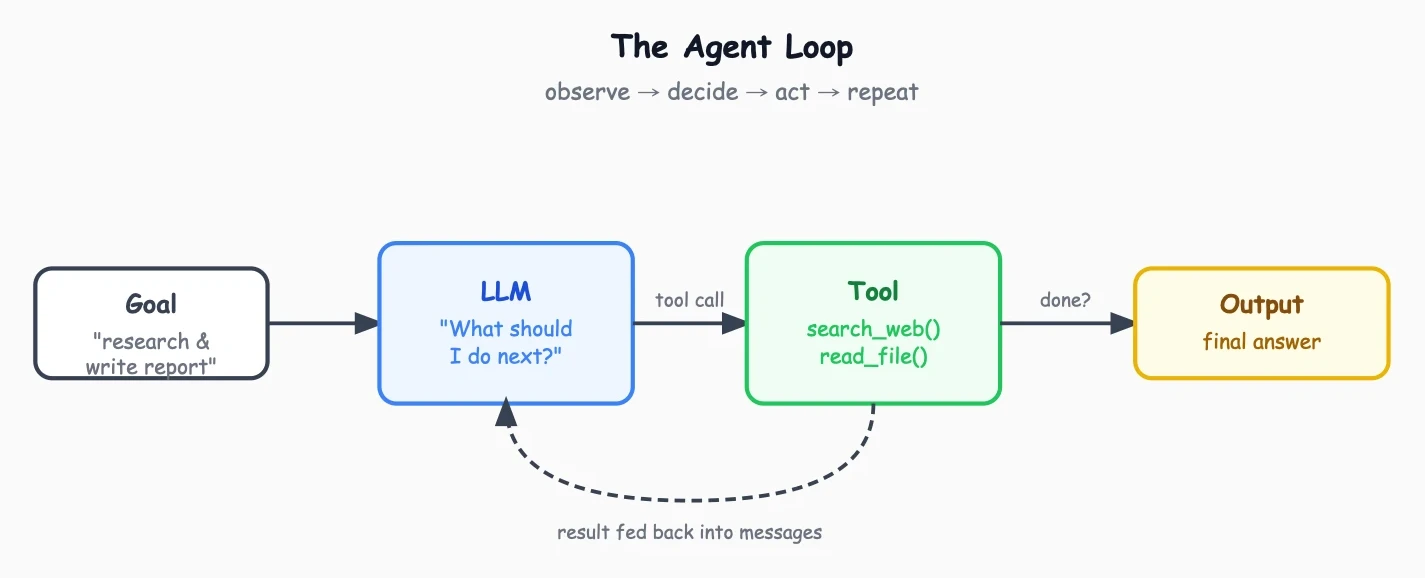
An AI agent is a program that receives a goal, asks an LLM what to do next, executes that action (either a tool call or a final output), feeds the result back to the LLM, and repeats until done. The LLM is the brain, the tools are the hands, and the loop is what makes it autonomous.
Every framework in this space, whether it's LangGraph, LangChain, or Smolagents, is a variation of that same pattern. The differences are in how they handle structured outputs, error recovery, and multi-agent coordination, but underneath, it's always the same loop. That's the only part that matters. Everything else is a tool definition or a message format.
The Loop#
Imagine you hired someone to research a topic and write a report. They don't do it all in one shot. They search for something, read what comes back, decide what to search next, maybe open a document, take notes, and keep going until they have enough to write the report. They're running a loop in their head: observe, decide, act, repeat.
An agent does exactly the same thing. The difference is that the "deciding" step is done by an LLM, and the "acting" step is calling a function in your code. Every iteration, the agent gets a little more context about the problem, and that context informs what it does next.
Here's what that looks like as code:
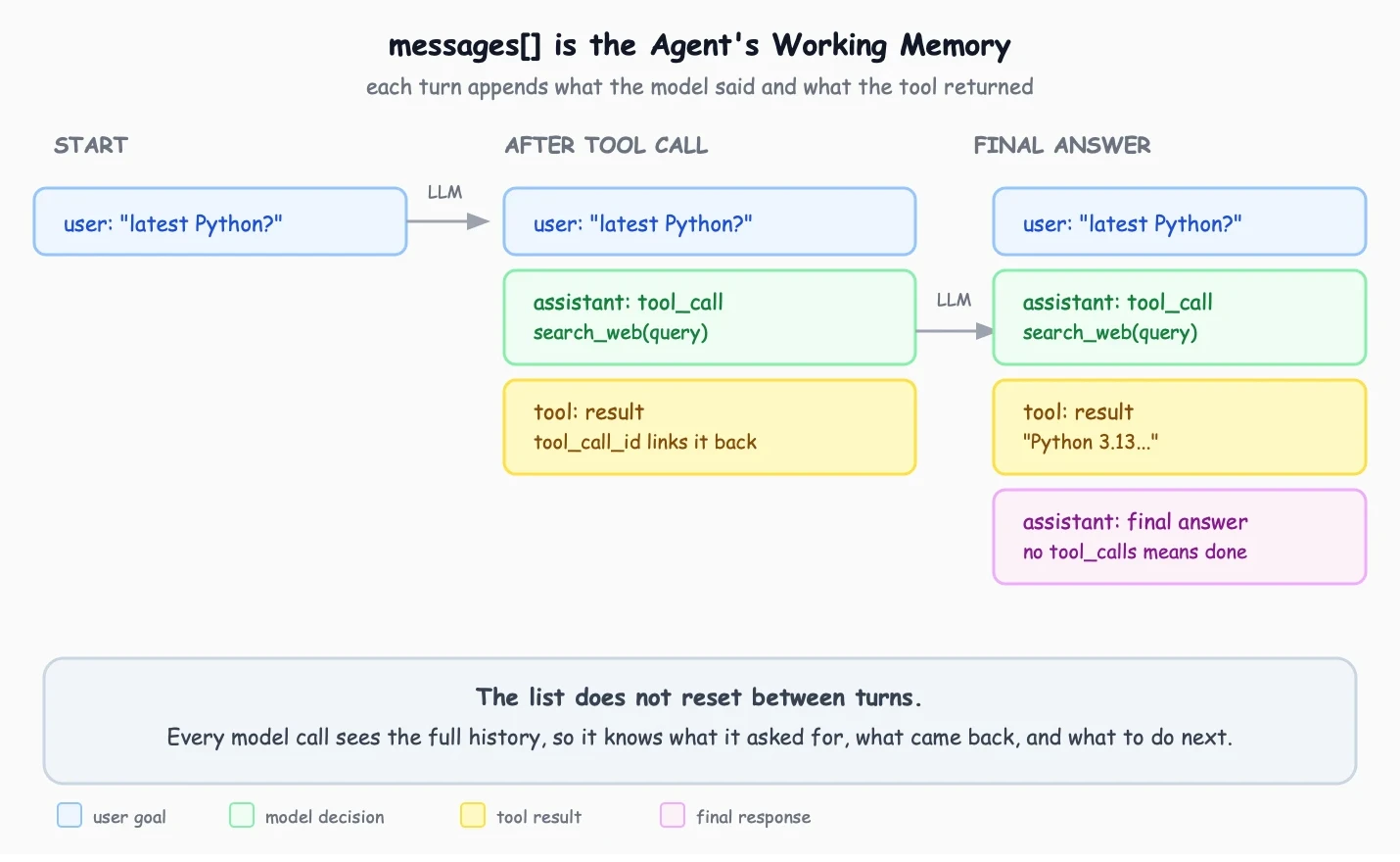
The interesting part is what the model does with accumulated context. By step 5, it's reading its own previous tool calls and results, and that history is what stops it from calling the same tool with the same arguments twice. The messages list is doing the work here, not the loop. The loop just keeps feeding that history back in.
max_steps is just a stop condition, the same kind of guard used in any loop or if statement. Eight steps is enough for a small example and cheap enough to run safely. Without a limit, a confused model can call the same tool again and again, each call costing tokens. When the limit is hit, messages[-1].content is returned, which is whatever the model last said. Real output, not a hardcoded error string.
Everything else in this post is just filling in the details of that skeleton.
The LLM Call#
The model needs to return a structured decision about which tool to call and with what arguments. There are three useful layers to understand here: raw function calling, a model adapter like OpenRouter, and an Agent SDK that owns the loop for you.
First, the raw function-calling pattern. Rather than parsing free text to infer intent, the model signals intent through a structured channel. Free text parsing is fragile. Function calling is not.
The API returns a list of tool_calls, not a single call. Most tutorials iterate over one. That's a bug. The tool_call_id field is how the model matches each result back to the specific call it made, and without it the API will reject the message.
Second, the model adapter. OpenRouter gives access to many models through a single OpenAI-compatible endpoint. One client, one base URL, and the model is just a string passed in per call:
MODEL_FAST for routine tool calls, MODEL_SLOW when a step needs deeper reasoning. The tradeoff is latency. OpenRouter adds a hop. For most agent workloads that hop is negligible because the bottleneck is the model thinking, not the network. For latency-critical applications, calling the provider directly is the better choice.
Third, the Agent SDK. This is the production-shaped version of the same idea. Instead of manually wiring the message loop, tool execution, and stop conditions, callModel owns the loop. Tools are defined with tool(), and stop conditions like stepCountIs and maxCost replace the manual max_steps check:
The SDK sends the prompt, receives tool calls, executes them, feeds results back, and loops until a stop condition is met. stepCountIs(8) is the same idea as max_steps; maxCost(0.50) adds a spend cap. Less control, much less wiring. The manual loop stays in this post because the goal is to see what the SDK is abstracting away.
The Tools#
Tools are just functions. They can call external APIs, query databases, read files, trigger workflows, or hit services like Firecrawl, Tavily, or Serper. You define the function, describe it in a schema, and pass that schema to the model. From there, the model picks which tool to call and the result goes back into the message history.
The description field is the only thing the model sees when deciding which tool to call. A vague description like "search the web" is weaker than "search the web for current facts not available in the model's training data." OpenAI's own function calling guide puts it well: write descriptions like API documentation for an intern who has never seen your codebase.
Memory#
Short-term memory is already solved. The messages list is the agent's memory for the current run, and every tool call and its result gets appended so the model sees the full history on every step.
Long-term memory, meaning remembering things across separate runs, is a different problem. It requires embeddings.
The pattern is to embed important observations from a run and store them in a vector database like Pinecone, Qdrant, or Chroma. At the start of the next run, the current goal is embedded, the closest past observations are retrieved, and they're injected into the system prompt. The temptation is to inject everything. Don't. A system prompt stuffed with 50 retrieved observations is worse than an empty one, because the model spends its attention budget reading context instead of solving the problem. Three relevant observations beat thirty irrelevant ones.
![Short-term memory lives in messages[], long-term memory lives in a vector database](https://cdn.buddhsentripathi.com/assets/blog-images/memory-architecture.webp)
Putting It Together#
This is the whole agent. The system prompt is one sentence. The loop is six lines. The tool execution is eight lines. Everything else is message plumbing. Run it and it searches, reads, writes, recovers from errors, and decides when it's done, all driven by the model.
When to Use a Framework#
Building an agent from scratch is the best way to learn what is happening underneath. It is also useful when you want to experiment with new features, build a custom workflow, or plug in your own tools and APIs without fighting an abstraction. The search_web tool in this post could call Firecrawl, Tavily, Serper, an internal search service, or anything else. The loop does not care. It only needs a function, a schema, and a result to feed back to the model.
Production agents are much more complex than this example. They need tracing, retries, budgets, permissions, evaluations, queues, human checkpoints, observability, and safe deployment paths. That is why agent SDKs and frameworks exist, and why so many people are actively working on them. If the goal is to ship a production system, using an SDK like the OpenRouter Agent SDK, LangGraph, Smolagents, or another mature framework is usually the better choice.
The point of this post is not that every agent should be written from scratch. The point is that writing one from scratch makes the abstraction obvious. Once the loop is clear, frameworks stop feeling like magic and start feeling like what they are: production-ready infrastructure around the same core idea.
And this is only the beginning. Tools can search the web, read files, manipulate the DOM, generate custom UI based on user interactions, call internal APIs, or retrieve information from a knowledge base. Agents can become retrieval-based systems, multi-agent workflows, browser automation layers, or product interfaces that adapt in real time. This post is the tip of the iceberg. If you want the deeper version, sign up for the newsletter.
More posts
The Architecture of an AI System
What actually happens between sending a prompt and getting an answer? A first-principles look at the architecture behind modern AI systems.
17 Sep 2026
Engineering Behind Bucket0
A cloud storage platform that runs on less than $8 a month. Here's how every engineering decision was filtered through one question: can we avoid paying for this?
14 Apr 2026
Prompt Injection is the SQL Injection of Modern AI Systems
Why prompt injection keeps appearing across agentic browsers, chatbots, and crawlers, and why it feels like a familiar security mistake.
12 Dec 2025
Get notified when a new post drops. It's free, no spam.